F# quotations visualizer
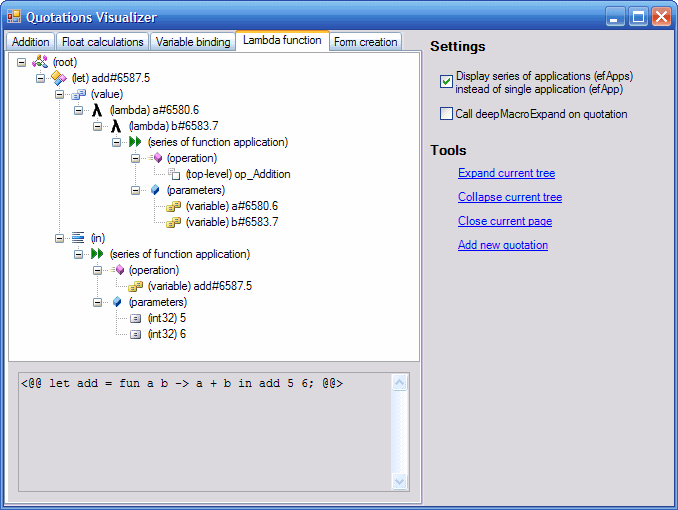
I already explained what F# quotations are and I explained how you can do some simple manipulations with it. In this article I'd like to present an application that I wrote and that can be helpful when working with quotations. It displays clear graphical representation of given F# quotation (using Windows Forms TreeView control).
F# quotations
This application works with raw quotations (this means the internal representation that is used when
writing quotation compilers). You can get F# quotations using <@@@@ ... @@@@> operator
and the type of raw quotations is expr. The expr type is following discriminated union:
type expr =
  | ConstExpr  of exprConstr * dtype list
  | VarExpr    of exprVarName
  | QuoteExpr  of expr
  | LambdaExpr of exprVar * expr
  | AppExpr    of expr * expr
  | HoleExpr   of dtype
You can see that there are only a few types of quotations, but when you are writing application
that works with quotations, you can use set of object that provide simplier view on quotations structure.
These objects (name starts with letters ef) can be found in the Raw namespace (see F# manual
[^]).
All these objects have Query method that expects parameter of type expr and that either
splits given expression into several sub-expressions or returns None (if parameter doesn't match).
So let's look at the example:
let q = <@@@@ if (a = 0) then 1 else 2 @@@@>
This is the quotation that represents conditional expression, but it is internally stored using AppExpr
(one variant of discriminated union), but you can use the efCond.Query method to test whether it is
conditional expression and you can also get expression that represents the condition and expressions representating
both true and false branches.
// Test whether q is conditional expression using efCond.Query
match Raw.efCond.Query q with
  | Some (_,(cond,trueBranch,falseBranch)) ->
      // cond        - 'expr' that represents condition
      // trueBranch  - 'expr' that represents the true branch
      // falseBranch - 'expr' that represents the false branch
      print_string "If-then-else statement"

  | None ->
      print_string "Something else"
This was just a few words to explain what the application does and to help you understand the source code of the most interesting part of application that builds the TreeView tree.
Application features
The application contains a few interesting features that I'd like to mention. If you look at the right panel, it contains section called 'settings'. In this section you can configure how should the tree representation be built. Using the first checkbox you can say, whether the function calls in tree should be displayed as single function applications (more functional approach) or as series of function applications (more imperative approach). To see the difference look at the following screenshots:


If you check the second option, visualizer will call deepMacroExpandUntil function
before displaying the quotation tree. This function performs some simplifications on
quotation before it is displayed. At first, the top level definitions are expanded and
it also performs beta reduction which means that any local binding are replaced by
its value. For example let a=5 in a+a will be reduced to 5+5.
(This is the reason why complicated example from the first screenshot looks so simple
at the second and third screenshot)
Source code
I won't describe the complete source code (you can download it and look at it), but I'd like to describe how is the code organized so you can easilly find what you want. The application is divided into several files (FS file contains the implementation and FSI file contains interface of the module).
The Main function that launches the application can be found in the
main.fs file. This file also contains a few quotations that are displayed
when application starts. The main form called can be found in the gui.fs
module. This module also contains dialog box that is displayed when user clicks
on the "Add new quotation" link (this form is called EnterCodeDialog)
and class inherited from Windows Forms TabPage that displays
given expr in a TreeView control.
The last two modules are much more interesting. The visualizer.fs
contains function getExpressionTree that takes F# quotation and
builds the TreeView tree. This file contains code that matches given expression
with several expression families like efApp, efMethodCall
and other (but it is still not complete). The last module is compiler.fs
and it contains function that takes string entered by user and returns object
representation of F# quotation. This function simply calls fsc.exe
and loads the value from the compiled assembly using reflection.
The solution also contains one C# project (called Resources). I created this
project because the F# application contains resources and I wanted to use resx
desiner in Visual Studio to easily create resource files. The main F# application
just takes compiled resources (the file named Resources.Main.resources
in the obj directory).
How to use it
Using is pretty simple, so I won't describe it, however there are a few details that I want
to mention. First, the application uses F# libraries (fslib.dll), but I created one package that
contains requiered libraries, so you can look at the application without installing F#.
Also if you want to be able to add F# quotations at runtime, you have to install F#, because
adding quotations uses F# compiler (fsc.exe). You also have to set the correct
path to the fsc.exe in application config file (quotvis.exe.config).
Downloads
- Download the application (63.4kB)
- Download the application (including fslib.dll) (384kB)
Published: Wednesday, 21 June 2006, 2:20 am
Author: Tomas Petricek
Typos: Send me a pull request!
Tags: meta-programming, f#